Creating a proposal:
In this article, you will find the structure of a good proposal, a ready-to-use example and template, a prompt you can copy, and the steps that make the process almost automatic.
 Етиен Янев
10 min read
Етиен Янев
10 min read
Quick answer: A good proposal has 7 essential elements: a header, a brief summary, a description of the client’s needs, a proposed solution, pricing and terms, a validity period, and a clear next step. Artificial intelligence (ChatGPT or Claude) can reduce the time needed to prepare it from around 20 minutes to around 5 minutes if you provide a template, context, and a rule against inventing information. The biggest time savings come from two features: skills, which retain your process, and AI agents such as Claude Cowork, which work directly with files on your computer.
Preparing a proposal is one of the most common business tasks. Sales and marketing teams, business owners, accountants, brokers, lawyers, and consultants all do it. And in almost every case, it takes longer than it should.
What is a proposal and why does its structure matter?
A proposal is a written offer to a client that explains what they will receive, at what price, under which terms, and how long the offer remains valid. It bridges the gap between the first conversation and a signed contract.
Structure matters because clients compare proposals. If the price is hidden on page 4 or the next step is unclear, your proposal can lose out even when your service is better. A clear structure communicates professionalism before you even meet.
The second reason is speed. When you use the same structure, you do not start with a blank page every time. This is precisely what makes proposals an ideal task for artificial intelligence.
The structure of a good proposal: 7 essential elements
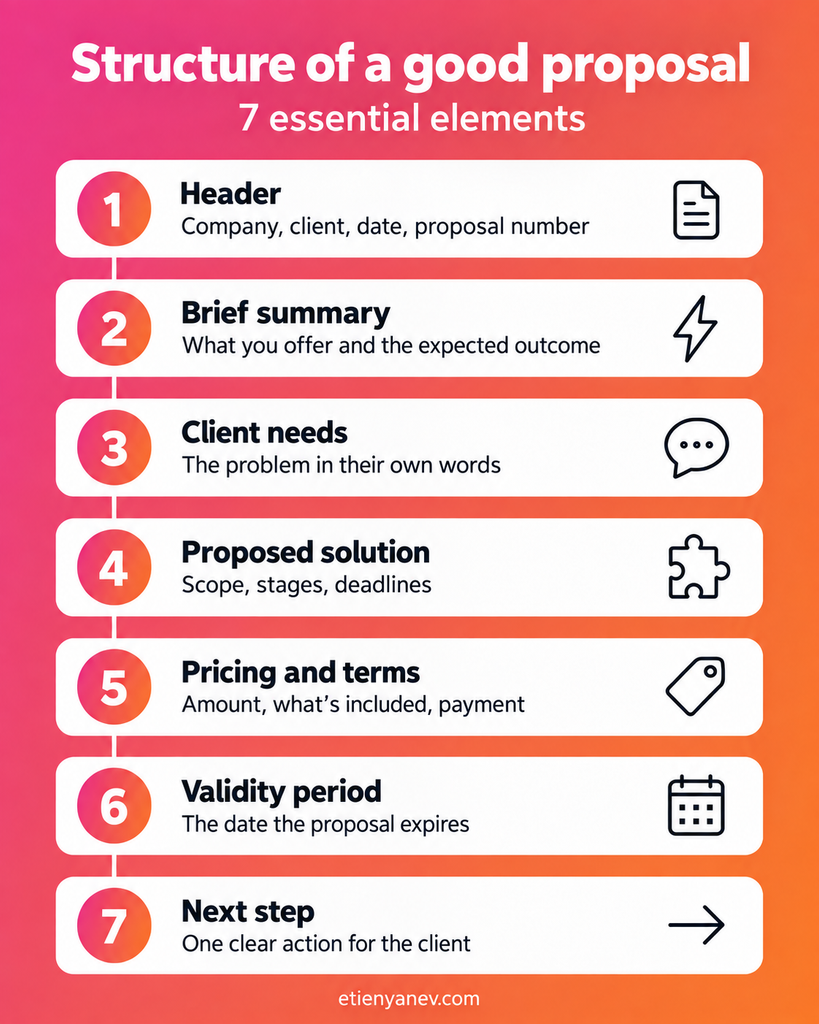
Every professional proposal, regardless of the industry, contains these 7 parts, in this order:
1. Header — your name or company, the client’s name, the date, and the proposal number.
2. Brief summary — 2–3 sentences explaining what you offer and the outcome the client can expect.
3. Client needs — their problem, described in their own words. This shows that you have listened.
4. Proposed solution — exactly what you will do: scope, stages, deadlines, and format.
5. Pricing and terms — the amount, what is included, and the payment method and deadline. No hidden conditions.
6. Validity period — the date until which the proposal remains valid (usually 14 or 30 days).
7. Next step — one clear action: “Confirm by email by Friday” or “Let’s schedule a 20-minute call.”
You can also add supporting evidence (client references, a short case study, or a testimonial) between the solution and the price. This answers the question “Why choose you?” before the client even asks it.
Proposal example and template
Here is a short example of a proposal for corporate training, organised around the 7 elements. Replace the information in brackets with your own.
PROPOSAL No. [number] / [date]
From: [Your company] | To: [Client name, company]
SUMMARY
We propose a one-day practical AI training session for your team of [number] people. After the training, each participant will use at least one AI tool in their daily work.
YOUR NEEDS
The team spends time manually preparing [documents/reports] and lacks a clear approach to using AI safely.
OUR SOLUTION
- An analysis of your processes before the training
- 6 hours of live training with practical exercises
- Materials and templates after the training
Deadline: by [date]
PRICING AND TERMS
[Amount] EUR excluding VAT. Includes: [what is included].
Payment: [method and deadline].
VALIDITY
This proposal is valid until [date].
NEXT STEP
Reply to this email to confirm, and we will schedule a short call to discuss the details.
This template is also the best material you can give AI. The clearer the example, the more accurate the new proposal will be.
How artificial intelligence helps with proposal writing
Yes, AI can prepare, review, personalise, and even send a proposal. The most suitable tools for this task today are ChatGPT and Claude.
The simplest approach works surprisingly well: open a new chat, attach an old proposal you like, and provide the new client’s details. The result is often excellent.
To be accurate, AI needs context. Always tell it:
- what business the proposal is for and who the client is;
- what the goal is — winning a new client, renewing a contract, or upgrading a service;
- what information it must include;
- to follow the template you have attached.
The most important rule: “Do not invent information”
Explicitly tell it to work only with the information you have provided. In my work, I have repeatedly seen AI fill in empty fields on its own: it invents figures, deadlines, and even services. Its goal is to make the proposal look complete, but this comes at the expense of accuracy. A single invented figure in a proposal can cost you the client.
The problem with this approach is that you have to repeat it every time: the same prompt, the same context, and the same clarifications. That is why the next two steps bring real automation.
A sample prompt for creating a proposal
Copy this prompt into ChatGPT or Claude, attach your template, and fill in the details in brackets.
You are an experienced sales consultant. Prepare a proposal for a client.
CONTEXT
- My business: [what I offer]
- Client: [name, company, industry]
- Purpose of the proposal: [new client / renewal / upgrade]
- Client needs: [the problem in their own words]
PROPOSAL DETAILS
- Service/product: [description]
- Pricing and terms: [amount, payment]
- Delivery deadline: [deadline]
- Validity: until [date]
RULES
1. Follow the structure of the attached template exactly.
2. Use ONLY the information I have provided. Do not invent figures, deadlines, services, or references.
3. If information is missing, leave a [MISSING] placeholder and ask me for it.
4. Tone: professional and clear, without unnecessary superlatives.
Rule 3 is a small trick with a big impact: instead of guessing, AI shows you what is missing.
Skills: how AI retains your process
A skill is a saved, detailed set of instructions that AI applies each time you invoke it. This feature is available in both ChatGPT and Claude.
Imagine this: today, you spend 20 minutes creating a proposal with AI — writing, checking, and editing. Tomorrow, you do the same. And again the day after. In just 3 days, you have spent an hour on the task. A skill addresses exactly this problem.
How to create a proposal skill
1. Work through the entire process once with ChatGPT or Claude until you are completely happy with the result.
2. In the same chat, write “Turn this into a skill:” and briefly describe the process you have just completed.
3. AI analyses the whole conversation, records all the steps and clarifications, and packages them into one detailed prompt — your skill.
4. Next time, simply write “Use the proposal skill. Here is the client information: …”
This reduces the preparation time from around 20 minutes to around 5 minutes.
How to edit and improve the skill
Skills are not fixed. If something changes, write “Make a change to the skill:” and describe it. For example: “Replace the workplace field with job title” or “Add a section with client references.”
You can also attach your own template: “Here is my proposal template. Analyse it and save it in your skill. I want every proposal to follow this template.” There may be small differences in the design, but AI will aim to reproduce it as accurately as possible.
AI agents: Claude Cowork and ChatGPT Work
An AI agent is a mode in which ChatGPT or Claude gain access to a folder on your computer and can read, edit, and create files. In Claude, this mode is called Cowork; in ChatGPT, it is called Work. Both require a paid account and an installed desktop application.
Here is how it works in practice: place the proposal template and the client information in one folder. Then ask the agent to check what is in the folder and create a new file containing the completed proposal. Working with information from several files, which you previously did manually, now takes just a few commands.
The most effective combination: skill + agent
I recommend using them together. Give the agent access to the folder containing your templates and data, and ask it to use the proposal skill. It takes the files from the folder while following the exact process you have agreed on. I call this accessible automation — anyone can set it up, and it works very well.
The same approach works for more than proposals: it can also be used for contracts, invoices, and any recurring documents. The aim is for AI to take on the tasks that consume a large part of your working day, while you remain in control.
| Approach | What you do each time | Time per proposal |
| Standard chat | Write the prompt, context, and rules from scratch | ~20 minutes |
| Skill | Provide only the client information | ~5 minutes |
| Skill + agent (Cowork/Work) | Place the files in a folder and give one command | Under 5 minutes |
Security and personal data: GDPR and the EU AI Act
Proposals contain prices, names, and client information, so security is not a minor detail. Follow these 4 rules:
1. Do not enter confidential information into free ChatGPT or Claude accounts.
2. Disable the use of your data for model training in your account settings.
3. Use business or enterprise accounts — they offer significantly higher standards of protection.
4. Comply with European regulations — GDPR and the EU AI Act also apply to how your company uses AI.
The right order is to identify your processes first, then determine where you can actually save time, and only then choose the technology.
About the author
Etien Yanev is an AI speaker, digital marketing consultant, and corporate trainer. He has delivered AI training for companies and organisations such as Sopharma, Vivacom, ProCredit Bank, and WWF Bulgaria. He teaches at New Bulgarian University and is the author of “Digital Marketing Compass”. He was included in Bulgaria’s Top 100 Talents for 2025 in the “Consultant” category.
In my corporate training sessions, we examine your specific processes, analyse them together, and identify where AI can save time while ensuring quality, accuracy, and data security.
Would you like your team to create proposals, contracts, and documents with AI? Contact me for tailored training.
Frequently Asked Questions
How do you create a proposal?
A proposal is organised into 7 parts: a header, a summary, client needs, a proposed solution, pricing and terms, a validity period, and a next step. Start with the client’s needs rather than your service.
What should a proposal include?
It must explain what you offer, at what price, under which payment terms, within what timeframe, and how long the offer remains valid. It is also helpful to add supporting evidence, such as client references.
Can ChatGPT or Claude write a proposal?
Yes. Both tools can write very good proposals if you give them a template, context about the client, and an explicit rule against inventing information.
How much time does AI save when creating proposals?
With a ready-made skill, preparation time falls from around 20 minutes to around 5 minutes per proposal. If you prepare several proposals a week, this adds up to hours saved each month.
Is it safe to upload client information to AI?
Only with business or enterprise accounts, with the use of your data for model training disabled, and in compliance with GDPR and the EU AI Act. Never upload confidential information to a free account.
What is a skill in ChatGPT and Claude?
A skill is a saved set of detailed instructions that AI applies each time you invoke it. You create one by using the command “Turn this into a skill” after successfully completing a task.
More from the blog
All articles